
Using InGrid in Kubernetes for XML-to-Print Formatting |
||||
|
RenderX InGrid software can be used in Kubernetes or Docker to dynamically generate hundreds of documents per second using industry-standard REST and SOAP APIs |
||||
Using RenderX InGrid in Kubernetes |
||||
|
Modern cloud environments allow for seamless dynamic scaling of workloads and RenderX formatting engine is not an exception. RenderX's InGrid is used in cloud environments, such as Kubernetes (including GKE, EKS and AKS or private/managed cluster) to format thousands of pages (PDF, PostScript, AFP, and other supported outputs) from customer data using industry standard REST or SOAP APIs while being able to dynamically scale the deployment based on workload and SLA requirements.
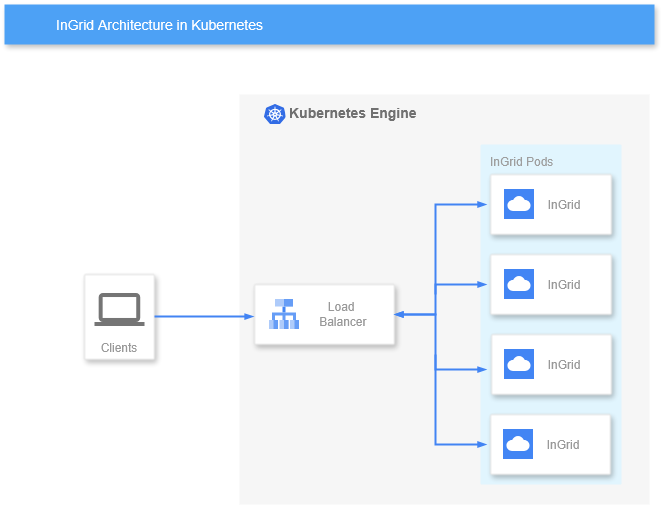
In this document we describe a simple scenario for deploying RenderX's InGrid in Kubernetes cluster using simple architecture:
As Kubernetes provides its own TCP load balancing capabilities via LoadBalancer Service that can dynamically adjust to deployment scale change and endpoint health status, it is used as a primary load-balancing component for InGrid deployments in Kubernetes InGrid containers are used typically in a single Formatter Engine per container configuration, which is a default config for renderx/ingrid docker images. Service exposes port 6677/tcp on the ExternalIP of the LoadBalancer and clients use this IP/port combination to access it and render documents.
Deployment Configuration for RenderX's InGrid in K8s
Reference implementation described here is based on Kubernetes Deployment. Deployment config below assumes that a separate K8s Namespace is used to deploy the application, special Label
apiVersion: apps/v1
kind: Deployment
metadata:
  name: rx-ingrid
  namespace: rx-ingrid
  labels:
    rx: ingrid
spec:
  replicas: 4
  selector:
    matchLabels:
      rx: ingrid
  template:
    metadata:
      labels:
        rx: ingrid
    spec:
      containers:
        - name: ingrid
          image: docker.io/renderx/ingrid:1.0.181
          imagePullPolicy: Always
          ports:
            - containerPort: 6677
              name: ingrid-port
          livenessProbe:
            httpGet:
              path: /
              port: 6677
            initialDelaySeconds: 60
            periodSeconds: 90
            timeoutSeconds: 10
This configuration also utilizes a liveness probe to check for container response on REST API port. Note 10 seconds Configure LoadBalancerWe use standard Kubernetes Service configuration that exposes port 6677/tcp on ExternalIP assigned by the cluster. Deployment selection is done via K8s Labels:
apiVersion: v1
kind: Service
metadata:
  name: rx-ingrid
  namespace: rx-ingrid
spec:
  type: LoadBalancer
  selector:
    rx: ingrid
  ports:
    - protocol: TCP
      port: 6677
      targetPort: ingrid-port
You can then access the Deployment via ExlernalIP assigned by the cluster on port 6677/tcp, as well as access it internally using ClusterIP. Apply Licence and Configuration Files
As
It is also possible to override existing configuration files, In the examples below we assume that Prerequisites:
Create Kubernetes Secret in the appropriate namespace from kubectl create secret generic rx-license --from-file=license.xml --namespace=rx-ingrid
Create Kubernetes ConfigMap in the appropriate namespace from kubectl create configmap fairy-conf --from-file=fairy.conf --namespace=rx-ingrid
Should you need it, you could also create ConfigMap from kubectl create configmap xep-xml --from-file=xep.xml --namespace=rx-ingrid
You can also use manifests to create the above resources. Once resources has been created, add them to the container
...
    spec:
      volumes:
        - name: license-xml
          secret:
            secretName: rx-license
        - name: fairy-conf
          configMap:
            name: fairy-conf
        - name: xep-xml
          configMap:
            name: xep-xml
      containers:
        - name: ingrid
          image: docker.io/renderx/ingrid:1.0.181
          volumeMounts:
            - name: license-xml
              mountPath: /engine/xep/etc/
            - name: fairy-conf
              mountPath: /engine/ingrid/etc/
            - name: xep-xml
              mountPath: /engine/xep/etc/
...
Once the Deployment is restarted, Accessing RenderX's InGrid Formatter Service in Kubernetes using REST APIIn the examples above the Service publishes a TCP LoadBalancer on port 6677/tcp on an ExternalIP assigned by Cloud Provider and on Cluster IP visible inside the cluster. You can then use standard InGrid REST or SOAP APIs as described in InGrid Documentation using |
||||